
Manage Your Panoee Subscription
Learn how to review Panoee subscription plans, compare plan options, and understand compatibility warnings.
Manage Your Panoee Subscription
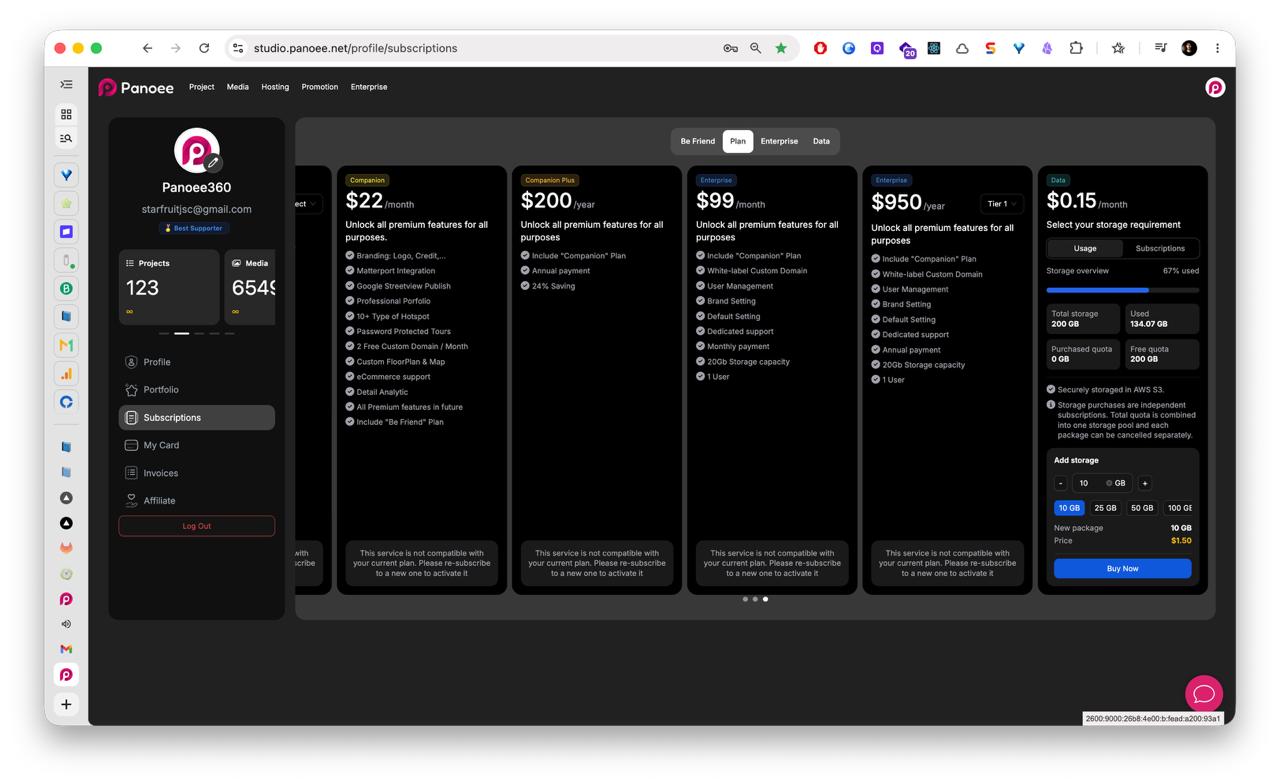
The Subscriptions page lets you compare Panoee plans, review available plan groups, and understand which features are included before changing your subscription.
Steps
-
Open Subscriptions
From the Panoee dashboard, open the account menu from your avatar in the top-right corner. Select Subscriptions from the account sidebar.
-
Choose a Plan Area
Use the tabs to review available subscription areas such as Be Friend, Plan, Enterprise, and Data.
-
Compare Plan Options
Review each plan card, including price, billing period, storage capacity, user count, and included features.
-
Review Feature Access
Check the feature list for capabilities such as branding options, Matterport integration, Google Street View publishing, professional portfolio, custom domains, analytics, eCommerce support, floorplans, maps, and support level.
-
Check Compatibility Warnings
If Panoee shows a compatibility warning, read it before continuing. Some services may require re-subscribing to a new plan before they can be activated.
-
Select the Plan Action
When you are ready to change or activate a plan, use the action button shown on the relevant plan card.
Notes
- Monthly and annual plans may have different pricing.
- Enterprise plans may include additional user management, dedicated support, and brand/default settings.
- If you are unsure which plan is compatible with your current account, contact support before changing the subscription.